
For images I use acdsee photo studio. It’s great for handling my 650,000 photos accumulated over the decades. It has saved me months of manual work.
For images I use acdsee photo studio. It’s great for handling my 650,000 photos accumulated over the decades. It has saved me months of manual work.
I'm amazed that still is going on. I remember when everyone used that on usenet.
I was too. I was looking for a solution, remembered it from back in the day, checked it out and was surprised. Tossed some money at a discounted license during a sale and was quite impressed with its ability to manage enormous photo libraries. It really makes it so much easier to compare dupes, fix metadata issues, get things properly labeled with the right dates, sorting, etc. I've saved almost 200GB of space by getting rid of dupes and finally have my family's lifelong collection of pictures nicely sorted into a fairly clean directory structure sorted by date. The metadata tools were terrific for giving Plex clean files to import, so now browsing a timeline has correct order by date and finding things is so much easier.
I literally just use a script that compares the hashes of files, and deletes any file with a hash it already knows
That is basically what all these programs out there do. They just do it in a more clever way.
For example: First you can filter out any file, that has a unique size, as these are definitly no duplicates. Then you could check the first and last X byte. are these unique? If yes, also filter out as no duplicates. If you have a lot of simmilar files, for example a lot of 500x500 jpeg, instead of looking at the first 5 bytes, build a partial has of the first 300.
And all files that are still candidates for duplicates can then be fully hashed and checked.
This is a far faster way than checking every hash of every file, as hashing is a very slow process.
Not all of them. Some programs can look "inside" image or other multimedia files (video or music for example) and compare them by content.
Comparison results may not be very good at times, but they are still better than direct hash comparison...
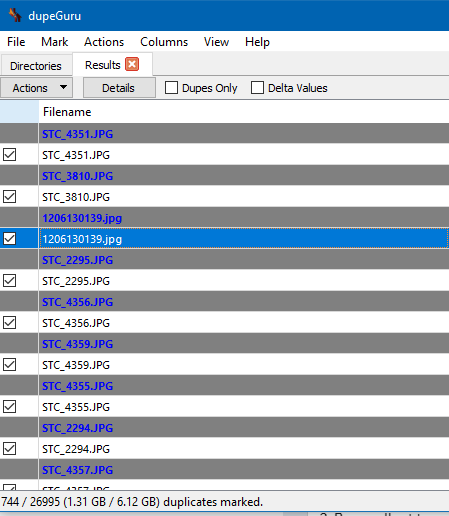
i found a program called dupeguruu, that has helped me discover i have about 6 gb of duplicate images. what software/ process do yall use to keep organized and prevent stuff like this from happening in the first place?
I personally have been using hydrus network (runs on windows/mac/linux) and been moving all images that I did not make/photograph. it stores by hash and won't import items that have the same hash (exact bit duplicates) and it has a duplicate indexer thing for things that look similar but different quality or res or crop so you can choose.
it also has built in scraper if you collect stuff from booru sites, twitter, artstation, pixiv so you don't have to keep on top of your favorite artists.
I have been considering maybe other programs/services like a booru or photoprism as well.
I wish I could et into it, but I'm not really happy with the fact it make another DB. I mean, I like having a "visual" organisation in my Windows' folders (like C:\Pic\Painting ; \Pic\Sculpture etc.). Dunno if that changed though. Also I can't use my own picture viewer but it may have changed since I tested it.
Yeah, it kind of annoys me that it does this also. I still use it since I don't need the organization as much anymore, but it would be really nice if they let you organize it in preexisting folders or determine tags that dictate which folder to go into
I do agree with you with it being put in a database, but I also agree with the program author with handling media with tags makes more sense with the amount of overlap. booru(danbooru gelbooru yande.re) and image sites don't use directories and use tags and you don't have a problem finding stuff anyway.
author also mentions technically on import you could tell it to save the directory as a tag and you can export back to directory if you wish as well.
as for opening yes it does have a right click open to open externally or you can default to open externally for media types or extensions you choose. you can also assign keyboard shortcuts to open externally like shift+enter or whatever you want.
Yeah, well, I can understand the idea behind. I just wish, but I guess this would be a big change, we could have the choice when we start it.
Yeah the export is neat, not enough but already a good thing. Thanks answering le about the pic viewzr
https://qarmin.github.io/czkawka/ I used to use dupeguru, but I like this one better.
Could you give some reasons for the switch?
The same person making the dupeguru docker container agreed to make one for czkawka, czkawka ran way, way faster than dupeguru and it has a lot of tools to use to search for dupes beyond exact dupes. I also like the interface more. My usage is just deleting one of the files though, so maybe the hard link requirement from elsewhere in this thread isn't satisfied, I don't know.
Here's the docker container: https://hub.docker.com/r/jlesage/czkawka
Super useful if you have your files on a different computer that is also running other things in docker. You end up with a nice web interface to vnc to run czkawka in and you get local speeds becuase you aren't running it over the network, it's local to the files.
Czkawka is a tool that I use to find duplicates
I have no idea how to pronounce that, so it just sounds like an 80s movie when I try.
chika-chik-ahhh
chkavka
https://forvo.com/word/czkawka/#pl
That tool does not support symlinks nor hardlinks.
Thats not true. I did a dupe search just 2 hours ago using Czkawka and then used hardlinks for storage reduction.
They don't work. The dev himself told me. I have an active issue on Github.
Again: That is not true. 1. You said, it does not support symlinks/hardlinks. It does. It has two dedicated buttons just for that. 2. Maybe there is a bug that it prevents from doing it correctly on some OS (wink-wink). That is completely possible. (You should try it again with the latest version, as the bug is fixed)
I know your issue on GH. But did you actually follow up on the progress there?
In his last answer before he reopend the issue, he said it is basically a problem how you (plural) are using the software, not that it does not work whatsoever. Admittidly it is bad UX. I also had that problem.
[deleted]
If you noticed there was a hint, you may have also noticed he said that your issue is based on the operating system. Perhaps they're suggesting your OS may be the cause of your issue?
"Fast duplicate file finder", Windows
Just use ZFS and enable deduplication.
Oh right, 'just'...create a new NAS with gobs of RAM (ZFS eats RAM) and move every file over to the system. Anyone can just shell out the money and time to do this instead of using other solutions. Simple! ◔_◔
That's what I do. So that's my answer. If I knew your reply would harass me for it then I wouldn't have bothered
Dupeguru is a wonderfull tool, especially with the option to set reference diretories/files, searching for duplicate directories insted of files, or the picture mode, with a similarity percentage. But I can also recommend Czkawka. It has a ton of useful features (dead symlinks, empty/zeroed files, ...). To be precise, it can do everything dupeguru can, except the duplicate directory search. And at least for me Czkawka is faster than dupeguru. At least a bit.
For photos specifically, I plan to give PhotoStructure a try as soon as I get some time. Looks like it has some nice features and also has a heavy emphasis on keeping your data in your own control, self hosting, etc. It's a relatively new piece of software I think but I have high hopes for it moving forward.
This is excellent : https://damselfly.info/
https://github.com/webreaper/damselfly
The developer is extremely active on it and both developer and software have great reputations
It even has 'face identification and organization'.
Thanks will check it out as well.
I'm the (solo) developer: feel free to ask me anything, either here, on /r/PhotoStructure, on the forum, or on discord.
The deduplication is quite solid (handling both exact and "fuzzy" variants): I'm not aware of any other software that handles more edge and corner cases.
You're correct about being new, though: there are a ton of features I'm looking forward to adding, but the libraries are uniquely cross-platform ((and cross-volume)), and the UI is snappy even when served over slower bandwidth connections).
Yep everything I've seen about PhotoStructure so far looks very intentionally designed so I'm excited to try it out. And honestly I'm at a point where I'm a big fan of you trying to turn it into a business (at least the way you're going about it). I get that people might not like subscriptions but I think it's one of the few reasonable ways to support software development and this is a use case which deserves support. The fact that you don't try and lock users in (eg never undoing work that the software already did) the way some companies do is also very nice.
Alternative: http://www.pixelbeat.org/fslint/
clonespy, make hash of file then check if there's any clone
I use bridge, to tag/quickly find specific pictures. it's on the slow side though so I'd like to switch to something a bit quicker if there's anything similar that won't require me to retag everything
edit: preferably something that doesn't use catalogs but just uses the directory tree
I've needed something like this for so long lol Thanks
For image files i always use visipics It's easy to find duplicates
For folks using linux, rdfind is a serially underrated tool. While it doesn't do image similarity %, it is very fast at finding exact duplicates of files
For photo and media organzation:
This is excellent : https://damselfly.info/
https://github.com/webreaper/damselfly
The developer is extremely active on it and both developer and software have great reputations
It even has 'face identification and organization'.
I guess that is OK. I hope it is doing more than filename... I prefer ones that compare visual similarity like Visipics.
i does do more than filename and does indeed check for visual similarity. it can also check the tags of audio files
oh, awesome then. I used it a long long long time ago and it didn't always figure out when they were different. now I know I can give it another shot when the issue comes up again. thanks!
video duplicate finder, video comparer, visipics, dupeguru, czkawka
Where do you get Dupeguru?
https://dupeguru.voltaicideas.net/
rmlint is excellent if you like command line program. LOTS of options.
https://github.com/sahib/rmlint

Hello /u/appleebeesfartfartf! Thank you for posting in r/DataHoarder.
Please remember to read our Rules and Wiki.
Please note that your post will be removed if you just post a box/speed/server post. Please give background information on your server pictures.
This subreddit will NOT help you find or exchange that Movie/TV show/Nuclear Launch Manual, visit r/DHExchange instead.
I am a bot, and this action was performed automatically. Please contact the moderators of this subreddit if you have any questions or concerns.