
[deleted]
[deleted]
“other”…😂
[deleted]
Do you have the ones where the step-brother teaches his step-sister how not to get stuck in the dishwasher?
Honestly, it's 40% appliance repair videos at this point...
Let's bring back the days of the pizza man
Is the pizza man your step-brother?
What’re you doing, step-pizza?
Ever heard of the shark in the bath? QUICK GET OUT
Linux-ISO's.
What if I need to lay some pipe, you know, for an older female client of mine?
My bad, I wasn’t passing any judgement. I thought it was for chrome cache.
Are they educational cat videos?
There's probably some pussies and classrooms in there, sure.
Does 4k make a difference in the viewing experience?
I’m with you there. I started maybe 2 years ago when I switched from Apple iTunes to Plex. That changed my perspective completely. With Apple it was such a PITA to manage I didn’t put much effort into it. With Plex it was so damn easy. Plex was basically whispering to me ‘Feed Me’.
~2 years later. I have 24k movies. The vast majority 1080p 264, some 265. 2k tv series mostly 720p or just HD. With Premium cable being an exception where I will have that in 1080p.
I have also started data hoarding music. Which is out of vogue due to how easy to use legit services are. But Plexamp calls to me.
And audiobooks.
I also have quite the collection of 4K Remux movies now. These are about 50GB a piece. I realized there is a 1%’er Netflix that most plebs have never heard of. I’m building my own version via Plex.
The 1% Netflix https://www.kaleidescape.com/movie-store/
[deleted]
This was going to be my question. If you’re just downloading like anything that hits a certain list or manually choosing all those shows and movies. I only download the tv and movies I want to watch and I thought it was impressive that I had like 500 movies and only like 80 tv series. I couldn’t possibly like that many movies or shows but people have different tastes for sure.
Well, there are several programs out there to help. Sonarr, Radarr, Medusa, etc. I use none of those haha. Not because I don’t like them, I just couldn’t figure out how to make them work. Eventually I did, but then I wanted more control.
The tools I run for movies I wrote myself and are powered by IMDb. Not using any IMDb API, just scraping their web pages.
I use the IMDb UID’s to then find movies to download.
Do I watch 98% of this? No. But if I ever do, I can open a movie like Heat, and in Plex I can click on Val Kilmer, and probably 80% of the movies that are on his IMDb profile (including TV movies) come up in Plex as available to watch.
The size is of my library isn’t my goal. It is the lists. Like Val Kilmer. But I also wrote custom programs to create collections in Plex. I think my Plex collections are my favorite feature of everything I have done.
An old pic of my movie collection
https://imgur.com/a/Hvcrie5
Looking now. That really needs an update. I added a hallmark collection that has like 500 in it, lol. And my standup collection is close to 100 now.
Heh I won't go into how much your missing out by not using the programs mentioned. I'm just going to chime in and say I too have watched probably 15% of my media. I picture myself watching the entire collection when I'm old and retired in my La-Z-Boy.
Agreed, and this sounds a little much for a lot of effort, and 24k movies is a little suspect too.
My hoard is nearly a complete opposite. 99% TV Series 1% movies. TBH movies don't hold my attention and are over far too soon. I've been spoiled by the flood of wonderful TV series that have came to TV, particularly in the last decade.
Even after binging a 6 season run, I still find myself in deep withdrawal wanting even more. TV series give creators so much time to allow for deep character development and so much time to allow for plot twists, etc. This can be a good or bad thing...but for a good series it gives the creators LOTS of room to stretch their creative legs. Far more creative content than can be squeezed into a 90 minute film.
I download 2-3 films per YEAR. I download 10-15 episodes of TV series everyday.
I admit there are some great movies out there. But they don't call me Multi-Terabyte TV Aficionado for nothing. 📺
I’d assume and hope that shows like „the expanse“ you only watch in 1080p or 4K :) and not just 720p
I have a very small 4K remux tv show library. GoT, Westworld, The Expanse. Just those take up about 2.5TB.
Awesome. To be fair I don’t see that much of a difference between for example a 14GB 1080p Blu-ray encode and a 26GB Vc1 remux of the blurry. I’m happy with my 11-16GB scene encodes (1080p/X264)
I expect that is true. I don’t download much 4K content, it takes too long. I use MakeMKV with and a special Blu-ray drive that can read 4K Blu-ray Discs. So I just rip it and done. I don’t bother trying to re-encode for saving space. With my 4K tv shows, I bought the the discs on Amazon. It would have taken me months to download 2.5TB out of an Eastern European VPN. Probably 2/3 of my 4k movie library is 4k UHD discs mailed from GameFly.
With 4k Blu-ray remux it is easier to just ship the data, like Amazon Snowball. GameFly Snowball, hehe.
Usenet with full speed of your internet connection would do the job as well I guess.
Yes I agree. Very few series are such gems that they deserve 4k. Westworld is definitely one of them. I have 5 or six others. American Gods being one and nature documentaries being another... not because of the quality of the series in these circumstances, but for the jaw dropping cinematography.
What's the 1% thing?
https://www.kaleidescape.com/movie-store/
Apparently Martin Scorsese swears by 'Uncompressed 4k' Which i take to mean 4K Bluray Remux. Basically a jukebox for 4K UHD Bluray discs, where you dont have to bother with physical discs.
Oh I see so you meant basically quality of the movie, not like there's a service with a cache of secret movies that only 1%ers have access to.
Technically, members of trackers that are very hard to get into and have tracker exclusives would be that 1%, I guess
Elaborate on what 1% Netflix is... I'd like to know.
Let’s be honest though, there’s only one way to get the media for Plex and it’s not via a legitimate subscription or paying per movie etc. I know it’s annoying having shows removed etc, but that’s why I stick with the subscription services.
Can anyone honestly say they have a massive Plex collection that’s sourced legitimately? Asking this genuinely as I’d quite like to hoard myself if there’s legit routes that make sense/are financially viable, as it’s really annoying having shows removed or continuing with a sub to access the same content.
I have a home server and a fast line that’s capable of it, but have yet to find the legit sources.
Billionaires and movie directors maybe.
You could get media for Plex by ripping your own DVD’s/Blu-ray. Or using a mail service like Netflix or GameFly, and ripping those. (GameFly rents 4K Blu-ray by mail).
I had a request the other day for an old PBS mini-series. It’s not available via any of the illegal means, it was however available at my local library. That’s in Plex now :)
Of course you will never build a massive library that way. Ripping discs is too slow.
With MakeMKV, I have digitally backed up my movie collection. I have two USB3 connected blu-ray drives and run two discs at a time. To get through it faster I'd rip them while at work and then dump them when I got home, averaging about 12 discs a day for a few weeks. I don't have 24k videos, but the vast majority of my library was ripped directly from the disc. Exceptions are movies that are on discs that give me trouble or are on hddvd because my drive stopped working.
How do you only have 265? So many of my older movies are only available in 264. Do you encode yourself?
OP mentioned Handbrake, but I would like to also recommend Tadarr. It uses Handbrake and FFMPEG, but it's great for automating the process.
[deleted]
Gotcha thanks. That's pretty low bitrate for me personally
[deleted]
Scenes without a lot of movement are easy to compress and maintain quality. But scenes with a lot of moving objects can get very pixelated very quickly. A good test is a scene that shows trees and leaves blowing in the wind.
The Big Lebowski
Well seams ok. but that's just like... my opinion dude.
Idk on my phone it's fine but I would want something crispier on my TV
I haven't really played with CBR X265, but based on my experience with X264, I would never want to use CBR or VBR for archival. Solely CRF rate control. Even something like CRF 25 with medium/slow would be good for me probably. I would rather spend a bit extra on storage than force everything into a small bitrate.
Make a comparison with slow.pics and the exact frames if you want to see the difference properly, there seems to be some banding in Ghost in the shell, along with some detail-loss and washed-out lineart.
With lebowski there also is some noticable detail-loss present, especially in the background where some pieces look like they've been washed over with vaseline.
Taxi Driver is the same as lebowski again.
Nightcrawler the same story over.
That is some impressive library you got there.
It only takes about 2 days to encode a film at VerySlow preset with X265 on a r5 3600.
Or just use nvenc, takes a fraction of the time with similar results to Slow / VerySlow
That looks like a lot of content within 40TB. May I ask what are your average movie and tv show episode file sizes?
[deleted]
The quality is honestly not bad. I’m impressed by how much content can be packed into 20TB. How are they accessed? Do you navigate with the default OS file explorer or something like Plex?
Makes sense with OP using x265. Huge file size savings, and I feel like most hardware has caught up to natively support it.
I still do a double take sometimes when I see the archive sizes on x265 releases.
i see these torrents of 22 minute tv eps taking up 1-2gb per episode and think to myself that it's way too big. nice to see someone else does similar sizes to me
How much storage space of it is original data, and how much is backups?
The third backup should be stored outside the house in case it burns to the ground, as houses are sometimes wont to do.
Also, hard drives really suck at long term archiving. Unpowered and without running periodic scrubs on the data (like you would if you had the ZFS file system in use) it can silently rot away. You can probably still retreive your por... uh, other, in 5-10 years but the video may be getting glitchy, or the headers in the video file be so corrupt your player won't play it. Worst case scenario, yes, but archiving on hard drives is not very reliable if it's not powered and being actively refreshed, and checksummed.
In my first job i did a year in industry before university, and one job of the QA department was to perform a copy of the archive 8" floppy disk every year to prevent loss due to the magnetic fields fading away. (Apart from the discs also being stored in environmentally controlled media safes, each disk in a special box)
Then in another part of the company, I found out how hard it is to really destroy the data on a disc using magnetic fields (best method is industrial incinerator followed by grinding to dust)
[deleted]
Well that’s stupid and you really blew it way out of proportion there at the end. If a service or private company decides not to allow you access to a certain media that is their prerogative regardless of the left or the right. If they want to edit media to change it then that’s also their option but doesn’t mean that media won’t exist in its original form somewhere or for purchase in its original form - this is most likely what will occur, issuing original versions of like Disney movies or whatever that has been changed for a premium price. Having said that, I do not rely on Netflix to tell me what I can and cannot watch in the first place so I couldn’t fucking care less what these dumb services decide to do with their offerings to their dumb subscribers.
This is a big one for me. Left wing activists are demanding we delete art because it offends them. And studios and services are obliging! It turns out people on the left can be just as scary authoritarian as people on the right.
there's nothing "scary" about not wanting oppressive media to exist.
I have all of my ebooks stuffed into my iPad
videos range from DVD to 4K BD
hard disks need to be powered up for a while to allow the drive to check the integrity
Nice collection! Do you also host it somewhere online ?
Have you (or are you planning to) watch all of the TV shows and movies that you've stored?
Dude this must have taken forever to do. I’m totally jealous, nice work.
“””OTHER”””. Its porn. Just say its porn.
[deleted]
You would definitely hate my setup. Have to swap out 24 drives at a time to get to another array.
Hey at least you HAVE 24 drives (or rather more than that).... sheesh!
That's pretty cool tho, do you have multiple NAS's? Or is it one large 24bay machine like IcyDock or EliteStor?
I have a number of 24+ bay chassis but largely use the NetApp diskshelf which is 24 disks. I have 7 of those but generally just use one. Have far more drives+trays than chassis slots to attach them, so I swap out as needed.
[deleted]
Wannabe anyway...ha
I'm the same. Currently a poor student with multiple drives, but still, I can't wait till I have the money to turn my old PC into a FreeNAS. I'm just going to go ahead and rip out the drive in my 8TB external and put it in there. I don't know how the OP copes at this level.
NAS is for data that is needed on a regular basis, also external hdds are a backup for the nas (in case of ransomware). If you store everything on your nas (and only there) you'll have a bad time if all your files get encrypted
If you use external drives to store data only there because you fear getting it encrypted then that's like saying "if my grandmother had wheels she would have been a bike". It makes little sense since you care enough about it to not want it encrypted by ransomware so the solution is to risk disk failures?
Disk failures are going to happen 100% of the time, the risk of ransomware is really up to what crap you download and execute and how permissions are set up. There's a lot of options out there to protect against ransomware either so even if you're worried about it it can be mitigated.
A NAS isn't just for data needed on regular basis, it's also for convenience amongst other things. Do you really want to waste all this time juggling with different external drives rather than having a NAS and be done with it?
I didn't say that owning a nas is bad. I'm using a DS918+ here, but there is a reason why my nas isn't the only place where I store the data. Easy to replace and smaller files are on my pc, bigger files and files that are a bit harder to find (or files I need to access from multiple pcs) are on my nas, the files from my nas are also copied to external hdds which are only connected while copying. The really important files are also backed up in two cloud locations. Also I'm thinging about a second nas and place it in my works server room (got permission and I'm the sysadmin), so that I could copy everything to it.
[deleted]
Yes and no. Most of the "data" people store here can be found over and over again. Specially popular movies and tv shows. Anime too. Now some stuff you think you will never find, I would pay for some cloud storage and get that there to be the safest. Which I can say I have about 1TB of stuff that I can't replace or find no more. Is just up to the individual and how much value they put on their data.
If you can find the stuff again then why bother having such a cumbersome solution in the first place? I mean it's not like it's easy to have these externals drives and connecting them, remembering what's on every drive. Keeping an index of which files stored on which drive so you can re-download it.
If you don't care about the data then why keep it in the first place and not just delete it after you watched it. To me it sounds more like a case of how much you value your time instead of data. Having to recover from a drive failure takes a lot more time like this, accessing data is harder to do, searching through it is harder to.
Even if you make a NAS with JBOD and merge it all together as one file system (with MergeFS for example) then you get one big pool with zero redundancy but you can easily access everything as if it's one file system. If a drive files you only lose the content on that drive and nothing else.
But hey to each their own but it sounds like once you keep buying external drives to store data because you don't want to delete it that it crossed the point of becoming important enough for a halfway decent centralized solution.
reading half the comments. seems that the case...
you'll have a bad time if all your files get encrypted
Don't let your regular PCs have write access over normal network share.
Use a filesystem with snapshots.
I think this should protect against most ransomware and accidental deletions on a file level pretty well.
A lot of people just buy to store stuff for the sake of storing it. They don't necessarily need to constantly access all their data. To that end, a bunch of externals that you just plug in when needed works fine.
I would like to do things like this but I am just scratching the surface and am complete noob. So how do you suggest someone that cant invest in a nas yet but has a couple of external hard drives and a computer?
Yeaahhhhh.. Maybe he doesn’t know how? That’s the only thing I can think of. You don’t have to be a network admin to set up a synology NAS.
But you do need the money. At prices today you are looking at around $2200 to get that 40TB into a NAS like synology.
1x5 bay synology @ $700
5x10TB disk @ \~$240 each is $1,200
+ tax and warranty if that what you may be looking at paying now. 2 x stimulus check would get us to here.
What is your setup now?
I have a windows 10 laptop, how do I set this up? Where can I find a tutorial?
[deleted]
Ya. Is it possible to plug my extra hard drives into my laptop, and then connect my laptop to my pc using a ethernet cable, and store data like that? Send data from my main pc, to the laptop, to the hard drive?
I wish someone could do some "easy" tutorial on how to to make a local network with raspberry or else.
I know it's not hard but well.
Aren't these all externals plugged into the PC? Same as your centOS laptop, it's easy to make them available from there.
[deleted]
[deleted]
[deleted]
[deleted]
Look into jellyfin. With plex, you have to pay to play (as you may soon find out)
Plex was a game changer for me personally. I sort of just happened onto it and decided to try it out. I didn't expect much, but now Plex is all I use for content consumption. Even bought a lifetime Plex Pass (it basically gives you extra features). I use Plex for movies, TV shows and music (people have conflicting opinions about the music portion of Plex, but I like it). Also tried KODI, but didn't like it at all (had a lot of issues and it wasn't as polished).
I think it's hard to imagine how useful Plex is until you use it. This is a short overview for why I love Plex:
Want to watch a movie? Search for the movie and hit add to library. I've got everything setup so that when I add a movie, a torrent crawler automatically picks out the best release based on the filters I have created (size, resolution, codec, scene, subtitles, amount of seeders etc). Then the movie and subtitle files (if they're missing from the torrent, they get pulled automatically) get added to my Plex library and then the torrent gets cleared from my drive (plus any unnecessary files that torrents usually come with). I can also specify movies in the future and they will automatically get downloaded when they become available.
For TV shows the process is similar, but in a lot of ways even more convenient. I can specify a TV show that I want to watch and when a new episode is released it gets automatically downloaded and added to my Plex library. You can specify shows on a season/episode basis. It's so good not having to worry about getting the next episode each week, but can just fire up my TV and hit play.
I use the music portion of Plex largely for its streaming functionality. For downloading I use Deemix/Deezer though (music availability is not that great with torrents). Works the same way though (add song/album/artist) and it all downloads within a matter of seconds/minutes. I can also download the music on my local device through Plex, so I don't use my mobile data (same functionality exists with movies/shows, but I mostly use it for music).
As an important disclaimer, the functionality I mentioned above is not natively supported by Plex (since that would be illegal). The amazing Plex community members have come up with some wonderful open-source plugins/apps. Plus a few scripts of my own for management/cleanup. It's taken me several years to reach this point and I'm still tweaking things as I go along. I'm aiming for Netflix level of convenience and I think I've largely achieved that.
If you decide to go with Plex, it will be a long journey, but well worth it in my opinion. Sorry for the wall of text, I just think Plex is an awesome platform and I want to share that 😃
*cough* jellyfin *cough* :)
Plex isn't the only option, for sure. But sadly I can't recommend anything else since Plex is the only one I've used for any significant length of time. So far Plex has been pretty good to me and I don't have a reason to switch, but competition is always a good thing 🙂
I do hate about Plex that they spy on you constantly although you already paid them 120€ for a lifetime subscription. And they always add features hardly anybody asked for. That’s why i dumped them for Jellyfin. The only thing different in my setup is that i use ombi to pick stuff to download. Searching directly in your media player sounds convenient though, I have to look into that for Jellyfin..
I've never used plex before so I can not comment on it or have anything to say since I've never used it. Its the one I hear about the most though. But once I decided on a synology nas and after doing some research, I found jellyfin to do the exact same thing for my needs and be cross platform with people I would be sharing it with. The plus of it all, is open source and the development is very active. Many how-to's are also written for Jellyfin online.
I remember KODI, I tried that as well.
I remember trying Plex as well and it misidentified nearly half of my collection (which was about 1200 movies and prob 8k tv shows at the time). It took me FOREVER to get some of them to identify correctly and I wasn't about to spend MONTHS of my time fixing their crap when I already had everything pretty well identified, and MCM created NFOs and things. I thought it was stupid it couldn't figure it out.
Anyway, I gave Emby a try and loved it. It's had a few hiccups (about 6 months where Anime wouldn't work grrrr), but overall I've been pleased with it. It gets maybe 1 in 150 movies wrong (usually a remake or at least something CLOSE to what it is), and same with TV shows. Worst I had was when it mistook the show Numb3rs with the anime Numbers. That's one I can understand.
I travel a lot, so Emby was a god send for me. I haven't looked at Plex in MANY years, I'm sure it's come a long way. I'm getting ready for a major revamp, and Emby's development has been dragging ass the last 2yrs, so I might bust oout a VM to give it a try.
most clients can support h264 native play back, and newer ones even h265 playback, so you could be able to get by without needing transcoding. (though it's always good to have just in case I suppose). This is with jellyfin, I assume it's similar for plex
The main cause of transcoding isn't a format incompatibility but an inability to stream the bitrate. If you're on cellular or shit hotel wifi you may only be able to pull a 4 mbps.
I can often pull plenty away from home, but my home upload is limited to 10 mbps (which is often already being used, cameras and backups and maintaining ratio and such).
Comcast sucks.
and maintaining ratio and such
Would probably be worth getting a seed box instead of seeding from home.
ah true, hadn't thought about that
Oh, and Plex clients, because it's a piece of shit app developed by arrogant holier than thou asshats, defaults to like 4 mbps for remote private servers, so if you have some muggle friend/family member install it they'll get a shit stream until you walk them through reconfiguring it.
Consider shucking them and putting them in an Unraid box - any old hardware will do.
Would love to do that. Newbie here, is there a guide?
Nevermind, found the wiki
Video here on the pin mod too. I just physically rip it out with some small needle nose pliers.
https://www.youtube.com/watch?v=9W3-uOl4ruc
Check out Spaceinvader One on youtube for Unraid tutorials. https://www.youtube.com/watch?v=9W3-uOl4ruc
What happens if your house gets robbed or there’s a fire? Do u have offsite backups?
[deleted]
[deleted]
[deleted]
Personally I’d recommend against using Amazon or other big name service providers because I’m a tinfoil hat kind of guy, and when you’re offered free tech. services it usually means you (and your data) are the real product.
Get a storage VPS instead for actual privacy and use SyncThing.
Would you say the same about backblaze?
A storage VPS would be pretty expensive.
Depends on what you consider expensive, and it depends if you’re only going to use it for a hundred GB or also back up other stuff to it too.
For 5 euro / month you could host your own via sync thing with 150GB and then have 50GB storage, 8GB ram & 4vCpu to do with whatever you please. You can easily host a ton of docker containers with that setup, and 5 euro / month is hardly anything.
I don't particularly recommand Amazon Photos. Their TOS say they can use your photos for advertising (not saying how though).
Google Photos is probably not the best but it's cleaner.
[deleted]
Even if you use Amazon Photos, you should probably use another service as a backup in case your Amazon Photos gets terminated.
Mine are on Google Photo, in my Google Drive, which is backed up on my One Drive, which is backed up to Backblaze and Amazon AWS :P
Oh, and a external drive in my wife's office. That's HER priority if the house is on fire.
Definitely good backup practices (unlike me)
Unfortunately that's ONLY for the pics. My Father-In-Law is a Master Photographer and my wife grew up doing photoshop work for him since her early teens. When I moved out in my mid 20s there may have been 100 pics of me. My in-laws easily have THOUSANDS of pics of every person in the family. Prob twice as much of my kids :P If even one was lost on my watch, I'd be killed without remorse LOL
I'm in the process of applying similar strategies for other data, but I can't exactly store 50TB of movies/tv in the cloud for various reasons. Limited bandwidth is only one of them.
Personally I have around 300-400 GB of data, including around 64 GB that is really important.
I backup to an SSD on my NAS every week, but I have no off-site backup. I tried merging multiple clouds together to have more space but it gave me only ~42 GB, and it is really really slow.
This is my strategy. Offsite backup for personal stuff, anything that I can download again I'm not worried about. Granted, it would suck to start over, but if my house burned down my media collection would not be in the top 5 of my worries.
With just 100gb , even burning to dvds or Blu-ray or putting on a flash drive would be an option.
If I am home, I have several tools for self defense.
Why do I have a feeling one of them is a Samurai sword replica?
I'm in this post and I don't like it
Oh that's easy...
In case of robbery I have a large boxer and pit bull who DO NOT like people they don't know in "their space" (ie the basement where the server is). Then it's bolted to a solid steel rack that's bolted to the foundation of my house. And the screws are stripped so not even I can get the damn thing out now, working on it is a serious PITA.
In case of fire the priorities are:
Server
Kids/Dogs
Wife
Other
Labor day weekend I'm actually hoping to solve the stripped screws issue. I'd just pull the drives. Dogs have cool little backpack things, I'd give each a couple drives. Knowing my daughter, she'd prob be down there helping me pull the drives. :P
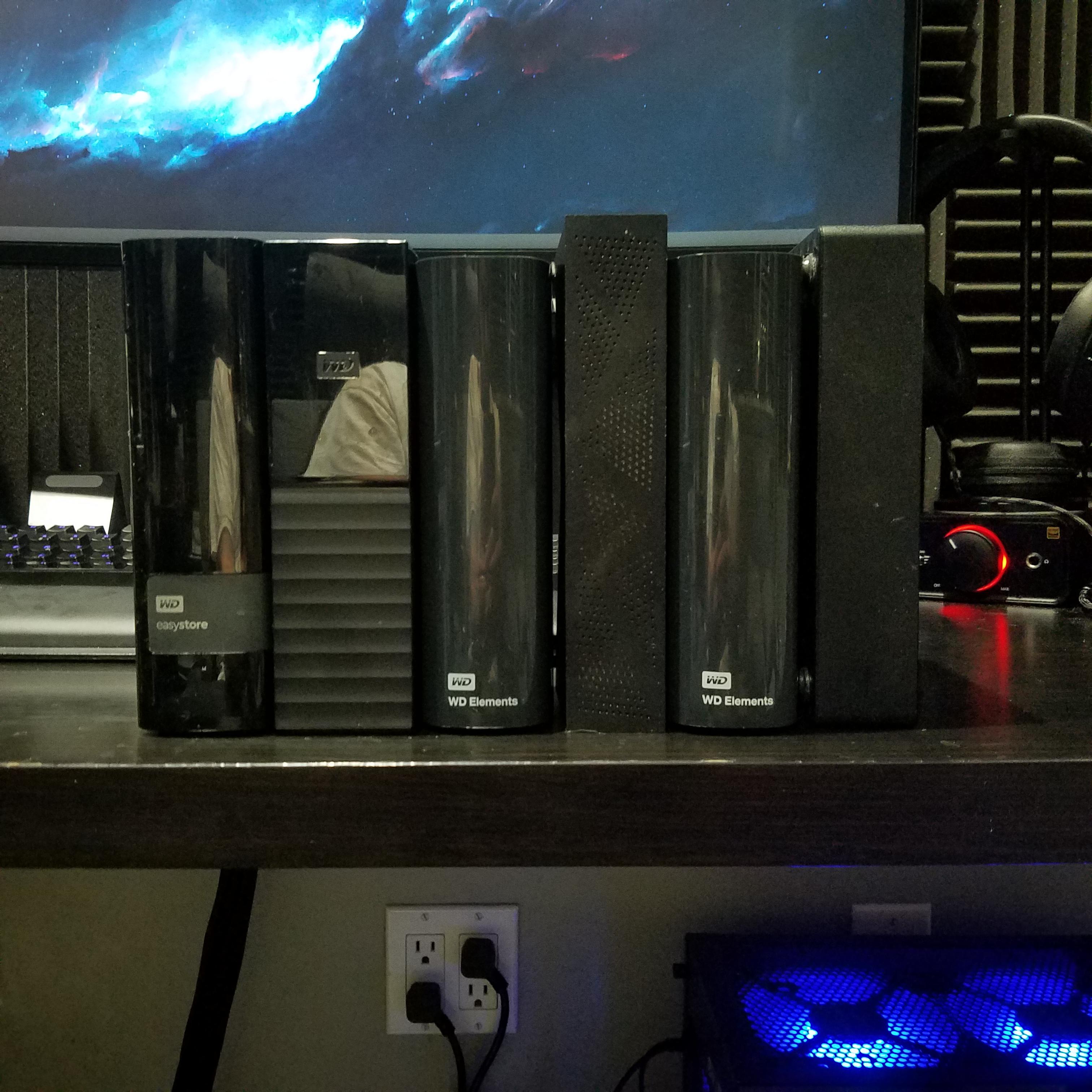
Do these drives not get super hot in their plastic enclosures? My only experience with WD My Books is testing them then shucking. Temperatures during testing were so high that I started resorting to carefully removing the outside shell and pointing a desk fan at the drive.
Oh my! Please shuck them all one at a time and make a ZFS or HW-RAID6.
This picture looks like data loss (to me).
Why don't you get a NAS? That way it's all in one place and you get the redundancy of RAID. That is, if you don't pick RAID 0
and power strike happen. dead data.
Backups are king in the world of data hoarding.
Just get a UPS. You can set it to automatically shut down your NAS safely in case of a power failure.
that priceless.
you think a ups will be able to handle a lighting strike or a massive power surge.
that cute.
If I had to fashion a theory, maybe it's because raid is not a backup and the cost of a system to use as a NAS could instead be spent on more storage which would also offer more redundancy. The safest storage is redundant storage kept offline.
Until your house burns down, then you need offsite backup
Hence redundancy.
But then you have the problem of forgetting which of the 5 drives you put a file on.
I've never had that problem. Labels are a thing. As are screenshots.
Getting a NAS is a pretty big cost. If OP doesn't need to access their files via network, a DAS could work just as well at half the cost.
It is a big cost, true. Which is exactly why I'm building one out of a Raspberry Pi. Costs about a tenth of the price and does the same thing.
I thought about this, but there would be so many power cables in my case.
I'm about to upgrade my computers, and the mobo (1150 chipset) is so old I can't reuse it or the RAM/CPU, hopefully it can be repurposed for storage.
Do you wish, in hindsight, you had the drives in 2 cases rather than split up in many?
Mine looks the same except I have 12 externals. They're all connected via USB, I just plug in the power brick for whichever one I need. The safest storage is redundant storage kept offline.
Those look like nice backup drives. I personally use a TR004 that houses 4 enterprise HDD's. It stays on 24/7 and has my entire collection on it's disks. When it's full I simply daisy chain another TR004 into the mix and keep on going. I wouldn't trust my data on the drives you have pictured. I have those same drives in use for backups of the above mentioned setup. The TR004 (Like a properly cooled PC tower) allows me to have four enterprise grade hard drives running, and most importantly with optimal cooling. I replaced the OEM 120mm unbranded Qnap fan with a Noctua iPPc 3k RPM 120mm fan. Drive temps never exceed 40 degrees C, even with 7,200 RPM Exos's. I hope that with a collection like you have that you are utilizing Plex naming standards, through filebot or similar. I also like to use Sonarr to make sure I'm not missing any episodes along with my TV Time calendar to keep things on track. Basically my directory structure is 3 simple directories. "TV Shows Completed" "TV Shows In Production" "TV Shows New" At one point I had things automated. But I found more joy in manually downloading and sorting files as part of the fun of hoarding.
I've got 12 enterprise 8TB drives in my rackmount server, it can only take 3 more, so I'm going to need to add an additional server with room for another 15 drives. I'm trying to decide what size drives to go with on this next one, perhaps 12TB or 16TB... haven't decided yet.
Go for 12tb Exos
My entire set is all Exos, so I’m on board with that, but why 12 specifically, price point?
Exactly. I've had my eyes on the 14's but overall if you check the sales usually the 12TBs have better price per TB. I've always paid $279 for the 12TB exos
Unless of course you can manage with the 10's those seem to go on sale left and right.Before this Chia madness I was getting them for $204. @ Newegg
Yeah, sounds about right. I’m running unraid, so I’ll finish filling up my 15 drives and hopefully 14 or 16 is priced well by then.
How some of you can live without fault tolerance is beyond me.
whats that? redundancy or like a surge protector?
Redundancy and ideally offsite backup.
What do u archive!
Same as me, I have all of them in external wd hard drive.
Looks amazing! I'm wondering if you use a USB hub to get more USB ports and if it affects the speeds of your connections.
[deleted]
Oh, I see. I suppose that makes more sense to not lose much speed while increasing USB slots, thanks for the reply and info!
Check out r/homelab
Are you concerned about the WD thing that was wiping storage recently? I unplugged an old WD cloud box. But to be honest I think it was older than any of the ones I see in your pic.
If you have the data on external drives you can back them up to Backblaze at 60$ a year unlimited, just remember to name each drive with a different letter.
Are any of those NASs? Or are they all just external hard drives? Also I really wanna go through your collection!
90TB of movies and TV series with no porn (I know that's hard for Reddit to believe but it's the truth).
40.....amazing...
You, like me if you ever move to Alaska will be LEGENDS. It's true that in Rural Alaska that movies and especially TV series trading is one of the most valuable barters in existance. I.E putting Ozark on a thumb drive and delivering via ATV or snowmobile for firewood, etc.
So you have 6 USB3 externals, how do you have them all connected to your desktop? I have run out of USB ports, and also I have the Asus X99 Deluxe 2 which shares the USB lanes with the video card and internal sata drives. Sometimes my speeds are not that great when I have all three of my drives transferring.
I should really get a NAS lolol.
I know this is probably asking a lot, but can you share a list of all the files with there file size. You dont have to share the details for personal and other stuff but, it would really help me understand how much data storage I should invest in because I am starting to do something very similar.
I pulled a WD drive out of storage recently which is apparently dead because it's only being read as a CD drive on any computer I plug it into. Hope you are periodically powering those up to check on them.
Data junkie. Oh yeah.
Hello /u/GrahamPhisher! Thank you for posting in r/DataHoarder.
Please remember to read our Rules and Wiki.
Please note that your post will be removed if you just post a box/speed/server post. Please give background information on your server pictures.
This subreddit will NOT help you find or exchange that Movie/TV show/Nuclear Launch Manual, visit r/DHExchange instead.
I am a bot, and this action was performed automatically. Please contact the moderators of this subreddit if you have any questions or concerns.