I really needed a moment until I realized a "winkey" wasn't a snack.
Edit: typo
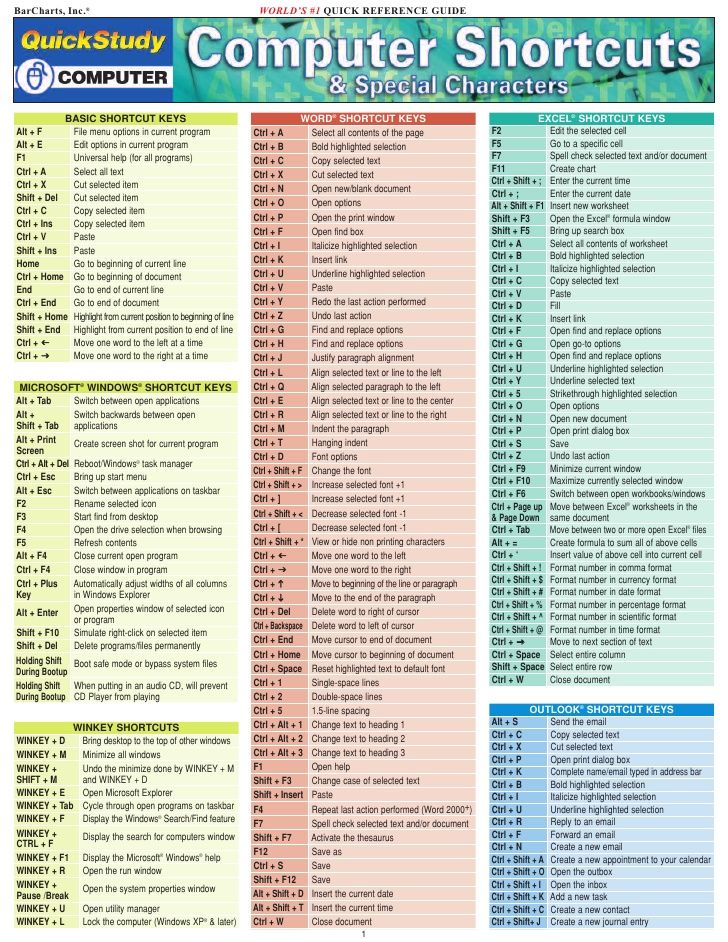
I really needed a moment until I realized a "winkey" wasn't a snack.
Edit: typo
I read it as winky and thought that maybe newer computers have emojis on the keyboards? Then I realized I was being dumb.
Ctrl + Shift + T restores your last closed Tab in Firefox. My most used shortcut
Same in Chrome. Love it.
This might be a copyright problem, BarCharts Inc sells these for money at the bookstore
That was my first thought. This is someone’s business. I used to buy their sheets on whatever I was interested in at the time, usually something I learned in school but forgot over time. Yes calculus, I’m looking at you. (I’m an engineer so it’s not too odd to want my math back up to snuff.).
Their business is selling physical sheets. There’s never anything proprietary about the information, it’s basic reference material. So someone could take the same information and copy/paste it into another PDF or JPG but that really seems trivial.
Does anyone have a higher resolution or a high-quality PDF?
why do people post images with small text in low res... they want us to suffer ;/ its really frustrating...........
here is a link to the actual pdf file
Ctrl + F for searching for specific text works in a surprising amount of places
here is a link to the actual pdf file
You're too low in this thread, upvote for source doc!
Mac version?
There’s an app on the Mac App Store (I forget the name) which allows you to hold down the ⌘ symbol for a second and an overlay of available shortcuts for the current app shows up. Pretty convenient!
Having a cheat sheet is good, but most of us won’t need to memorize dozens of shortcuts; most of us only need a select few for each app. After a while, it becomes muscle memory.
https://www.ergonis.com/products/keycue/ (For Mac) Keycue is a great app. Been buying it for the last 4 versions..
The name is CheatSheet
Ctrl becomes Cmd
Not for all of them, for instance cmd + Q would quit the document, even in word I’m pretty sure
Cmd + W : Quit current document
Cmd + Q : Quit any application
Yes ur right. But how would u replace it with the ctrl + Q shortcut in word listed above? Would u just so Ctrl + Q on the Mac?
No, it’s all over MacOS Cmd + Q to quit. Not sure if you can modify this, maybe creating a home shortcut in System Preferences. If you click the “Word” menu when in Word, you’ll see the the Quit menu item with its shortcut.
I use ctrl + arrows all the time. Its so useful yet simple
Alt-F4 exits pron
Love it... another guide I’ll save then google when I need it, forgetting I had saved it...
Do you have a lot of those too? I have many helpful little guides like this, but never remember them until after the fact.
Saw a store in the US where you could buy this on a plastic piece of paper, as well as loads of other stuff. Quite handy actually.
Literally printed this out and hung above monitor. so good. thanks!
Ctrl+S
anybody know where to get a higher res that's actually legible?
I'm a bot, bleep, bloop. Someone has linked to this thread from another place on reddit:
^(If you follow any of the above links, please respect the rules of reddit and don't vote in the other threads.) ^(Info ^/ ^Contact)
I've never hit the save button so fast on Reddit before
Ctrl+S
The Word section should be blue and the Outlook section should be yellow.
Shame there isn't WINKEY+number to open the corresponding taskbar app
f2 renames the file you have highlighted, so you don't have to risk clicking it at the wrong speed and open it.
I read Win-Key as “winky ;)” and was very confused
Now do EMACS.
A helpful windows shortcut not mentioned is winkey+1-9. This will allow you to open any program in the taskbar corresponding with the number. (IE: winkey+1 = first program on taskbar. Winkey+2 = second. So on and so forth.)
My new favorite one is WINKEY + SHIFT + S to to let select part of the screen to copy a screenshot of to the clipboard.
/r/Nostalgia
Doesn't have my favorite hot keys!? Winkey+right arrow/left arrow will make a window take up the right and left half of a screen respectively. Winkey+up arrow maximizes the screen, and down returns it to its original scaling, or minimizes it. Super useful if you, like me, often have 3 or 4 excel spreadsheets open at once.
I'm gonna save this and hopefully look at it
CTR+Right Shift+TAB+F7 closes a tab, saves you clicking the 'X' on the tab.
Ahhhhy yes, the good ol' ALT+F4 cheat code in every online game
Forgot the best shortcut for dual monitors (especially when you don't feel like turning on your second monitor, but a program opens on that screen)
shift+winkey+left or right
Missing one of my favs: Ctrl + Shift + V
This is "paste plain text (without formatting)" command. For instance, if you copy the huge bold heading of a website and want to paste it into word or Gmail, using this command will paste the plain text, wheras a regular paste may have the pasted text be the huge, bold size that it was on the website (and same font). It'll also remove hyperlinks while keeping the text that was hyperlinked. Heck, it even works if your pasting text into Reddits own comment boxes which I'm using right now to type this.
This is a very outdated guide. Where Winkey-X? Where's Winkey-
alt+ is also deprecated.
you'll find many posts on here are outdated af
I think that the CTRL + Alt + Del combo should be revised, since this now open a different screen from the Task Manager, which can be opened by CTRL + Shift + ESC.
[deleted]
Yep. The other hand on your... err... mouse.
Fun fact: In Swedish colloquial slang, mouse can refer to the female genitals.
I know your post is 7 hours old, but I'm on the pot and am going to reply anyway. The difference between CTRL + ALT + DEL and CTRL + SHIFT + ESC is that CTRL + ALT + DEL sends an interrupting command to the cpu (with priority) while as CTRL + SHIFT + ESC does not. CTRL + ALT + DEL is like saying "Hey I need this shit open now" and CTRL + SHIFT + ESC is like saying "Hey you get this open when you feel like it, PC". If you're trying to kill a frozen program, CTRL + SHIFT + ESC may not be as effective because of this reason. I typically use CTRL + ALT + DEL even though it's one more mouse click.
This is something I didn't knew...
But still, after C+A+D, when I need the Task Manager, doesn't it have to wait for system time to open it?
I was about to comment about the CTRL + Shift + ESC command, it took a little while for me to get used to using it. But now that I know it, I've never used CTRL + ALT + DEL since.